


Microsoft 365 admins can use Copilot to simplify user management, licensing, and troubleshooting. Take the next step by assessing your environment’s readiness for AI-driven administration.

Meet the Microsoft 365 Admin Agent
Admin Tasks with Natural Language
Microsoft 365 admins can now complete common admin tasks using natural language, reducing time spent navigating the admin center.
Yes, just like Microsoft 365 Copilot can reason through data in a user’s Microsoft Graph, Admins can enjoy a similar experience when reasoning over the configs and logs in the M365 Admin Center (MAC).
You do not need an extra paid Microsoft 365 Copilot license for the admin account to use GenAI in the admin center (as long as you have one license for someone). No Security Copilot SCUs either.
Q: Do You Need a Copilot License for Admins?
A: No. Admins can use Copilot in the Microsoft 365 Admin Center without an additional Copilot license, as long as at least one licensed user exists in the tenant.
Two Ways to Use Admin Copilot
There are two ways to use the Microsoft 365 Admin Copilot capabilities:
- Use the M365 Admin Agent
- Use Copilot within the MAC itself
Using the Microsoft 365 Admin Agent
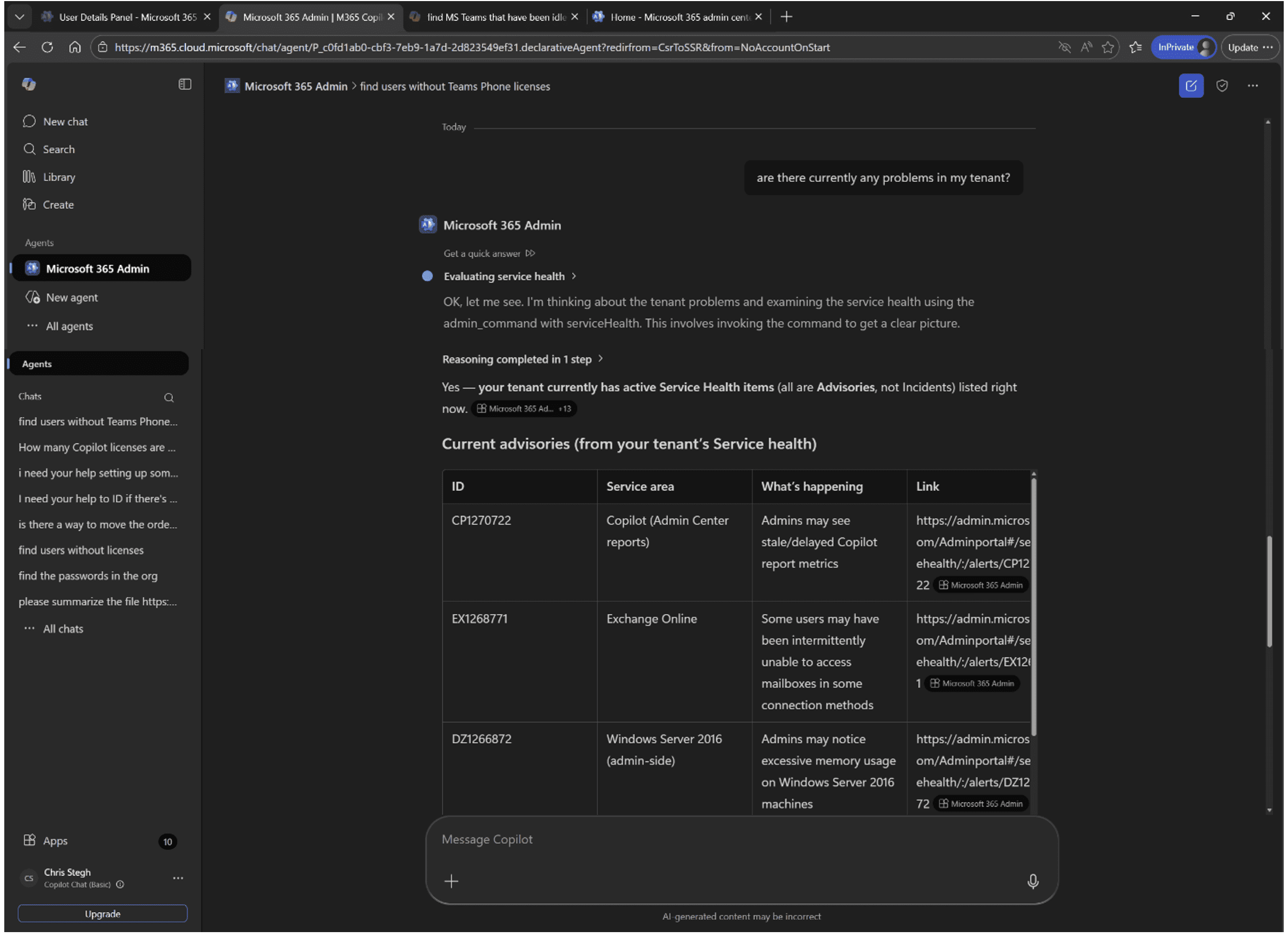
The Admin Agent is provided by Microsoft and is available through the Copilot Agent Store. It works like a standard chat interface.
If you follow best practices and use separate admin and user accounts, you will need to log in with your admin account to use the agent. You can’t use this Agent while logged in as user@contoso.com. You need to be logged in as admin@contoso.com.
How to Access It
- Install and start using it
- Open a private browser session
- Go to admin.microsoft.com and sign in as your admin account
- Navigate to www.microsoft365.com
- Open “All Agents”
- Locate “Microsoft 365 Admin” under “Built by Microsoft”
Example Prompts
After installing it from there, you can prompt for things like:
- Find groups without an owner
- How many available licenses do I have?
- Are all these users licensed? Jane Doe, John Doe?
- Find users who don’t have a Copilot license
- Find users who can’t sign in
- Where do I reset user passwords?
- Where do I assign admin roles?
The agent often shows the steps it takes to answer your query, which can be helpful for learning the admin workflows.
Some prompts may not fully execute. In those cases, the agent typically provides step-by-step instructions to complete the task manually. (i.e. “find MS Teams that have been idle for 180 days” instructed me on three ways to click through the admin center to get this info.)


Using Copilot Inside the Admin Center
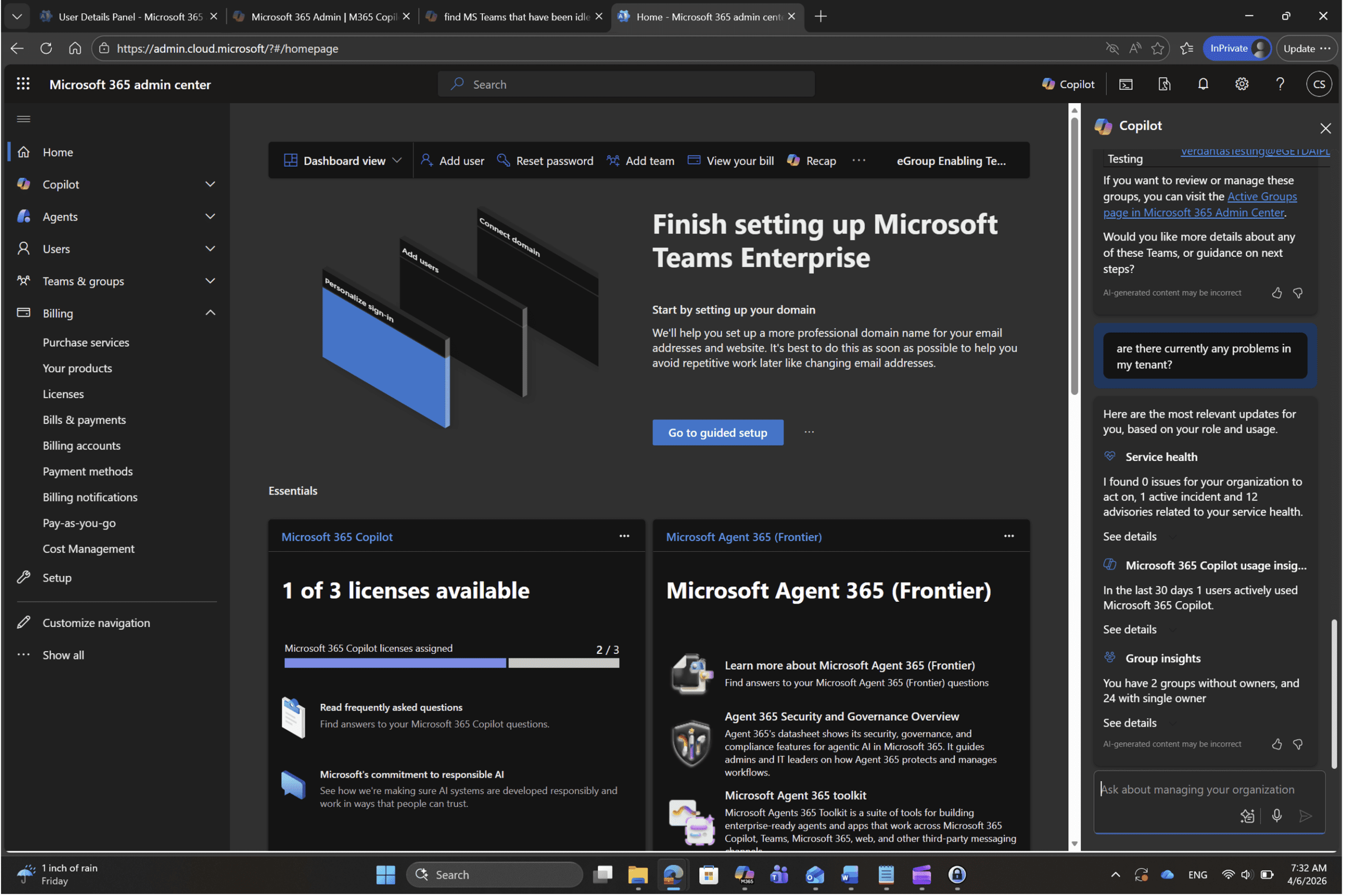
When logged into the Admin Center, you will see the Copilot icon in the top-right corner.
This experience is more powerful than the standalone agent and can return more detailed, data-driven responses.
Example Prompts
- Are there currently any problems within my tenant?
- Which users have had failed logins in the last 30 days?
- What SharePoint sites have not been used in 60+ days?
- What Teams have been idle for 30 days?
- Which users have Teams Phone calling plans?
In many cases, Copilot inside the Admin Center can return direct answers instead of just navigation steps.
Current Limitations
Some requests still fall outside Copilot’s current capabilities.
For example, queries like “Which users have had failed logins in the past 30 days?” may return instructions instead of results, pointing you to sources like the IdentityLogonEvents table.
These limitations are due to the current scope of available “skills,” which continue to expand over time.
Current Limitations to Expect
Not all admin queries are fully automated. Some prompts return guided steps instead of direct answers due to evolving Copilot skill coverage.


Final Thoughts
While not perfect, the Microsoft 365 Admin Copilot experience is already useful and continues to improve. Since it is effectively included with your existing licensing, it is worth exploring as part of your daily admin workflow.
Why This Matters for IT Teams
Using Copilot for admin tasks reduces time spent navigating portals, improves visibility into tenant health, and enables faster troubleshooting across Microsoft 365
Assess Your Copilot Readiness
Make sure your Microsoft 365 environment is ready to fully leverage Copilot for admin efficiency and visibility.

