


Microsoft Copilot can surface existing data governance issues across SharePoint, Teams, and Microsoft 365. eGroup’s eQIP framework helps organizations use Microsoft Purview to assess risk, classify sensitive data, and prepare for responsible Copilot adoption.

Most organizations won’t wait until their data governance is perfect to deploy Copilot. The business pressure is real, the use cases are compelling, and the productivity gains are measurable. If your CEO is asking about AI ROI (and nearly all are), “wait until we fix our data security” isn’t the answer.
Across dozens of advisory engagements, I’ve seen a clear pattern: the organizations that get the most out of Copilot go in with eyes open about their data. They don’t wait for perfection. They quantify where they stand, mitigate what they can, and move forward with a plan. That’s a very different posture than flipping the switch and hoping for the best.
Key Point
Microsoft Copilot does not create new data risk. It makes existing access, sharing, and governance gaps easier to find. That is why Copilot readiness should start with understanding your Microsoft 365 data environment.
Copilot Can Reveal Existing Data Risk
One of the first things I tell nervous clients is that Copilot doesn’t create new risk– the risk already exists. If users can reach sensitive files they shouldn’t, like HR records sitting in a broadly shared SharePoint site, financial data in a 200-member Teams channel, or contracts nobody’s cleaned up in years… well, a clever SharePoint search will surface it. Copilot simply makes the search easier.
So the question isn’t whether Copilot is safe, it’s whether your data environment is in good enough shape to support it responsibly. For most organizations, the honest answer is a resounding “kind of.” Not a disaster, not the Wild West, but there are always gaps, and they’re worth understanding before you scale beyond a few trusted groups.
This is where Microsoft Purview comes in: the platform for data classification, information protection, and data loss prevention. It lets you see what you have, label it appropriately, and put guardrails in place. Your Microsoft 365 E3 or E5 environment already includes it. The problem isn’t access to the tools, it’s that most organizations either haven’t applied them in a systematic way that works for the organization.


Deploying Purview Is The Easy Part
I mean that literally. Configuring Purview sensitivity labels, enabling DLP policies, and applying these controls to your M365 data is often only a few weeks of hands-on-keyboard work, and it goes fine. What often takes 12 to 18 months (or longer?) is everything else: figuring out what data you actually have, deciding how to classify it, getting policy owners to agree on what “sensitive” means, and building the habits to sustain it.
Most Purview projects that stall don’t stall for technical reasons. They stall because nobody did the upstream work. The taxonomy doesn’t match how the business thinks about its data. Nobody owns the DLP policies once they’re live. The project was scoped as an IT implementation when it is really a business program.
This isn’t unusual, and it’s not a sign you’re behind. It’s the norm. I see it across financial services, healthcare, education, legal, and government. The technology has matured faster than the governance programs meant to support it.
The fix isn’t to slow down. It’s to be more deliberate about the order of operations to be able to speed up.
The eQIP Framework For Copilot Readiness
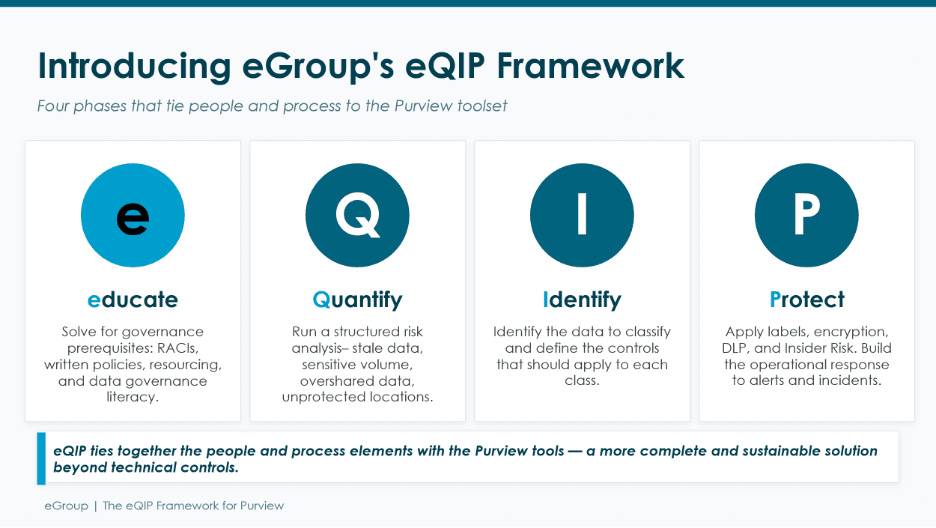
eGroup developed eQIP to help organizations work through that order of operations and to connect data governance directly to AI readiness. The name reflects the sequence: Educate, Quantify, Identify, Protect.
Educate
Educate is where it starts, and it’s the fundamental step. Before any scanning, labeling, or policy work begins, everyone involved in data security and governance needs to understand their role in the process, decision-making, and what impact Purview will have on their team. This usually means including the data owners, operations, legal, compliance, or HR in the project. All of them should have a shared understanding of what the organization’s data security and governance goals are, a high-level understanding of what Purview does, what it doesn’t, and what you’re actually trying to accomplish. In practice, the team needs to:
- Align on goals
- Surface assumptions (and challenge them)
- Ensure decision-makers understand the choices they’ll face downstream.
- Document “the rules of the road” through RACI charts, written policy reviews, and resourcing the new program.
Establishing clear service ownership and executive co-sponsorship outside the technology team are critical outcomes. Both the technical work and organizational changes happen faster when the people are pointed in the same direction.
Quantify
Quantify is where you assess your actual data risk and exposure. Before you touch a label or configure a policy, you need to know what data you have, where it lives, what processes it supports, and what obligations apply to it. (Think regulatory, contractual, or reputational.)
This is more than an IT exercise; it combines system-generated metrics with conversations with business leaders across the organization. The output is a clear picture of your data environment grounded in how the business actually uses and transacts with sensitive data. This is where risk is articulated and prioritized while determining the best ways to mitigate it.
Identify
Identify is where you build the classification framework.
- What sensitivity labels do you need? How complex should they be?
- What does “Confidential” actually mean for you versus “Internal”? How do you handle data that straddles categories? Do your SITs or other classifiers need to be tuned so detections are more accurate?
- How do your DLP policies need to be structured to prevent data leakage, but allow authorized data sharing?
Usually, we start with the highest-risk categories — ePHI, PII, PCI, and similar regulated data since all organizations need to protect them and get those right before you expand.
Protect
Protect is where the rubber meets the road. With solid labeling and DLP controls and clear policy ownership in place, Purview is configured to enforce DLP limits, labeling rules, automation, and Copilot governance settings. This is where Purview brings your written policies and requirements to life. Often, the process starts with reminders and warnings, with active enforcement or blocking happening as people get used to the requirements.
What Is eQIP?
eQIP is eGroup’s framework for preparing organizations for Microsoft Copilot and Purview adoption. It guides teams through four phases: Educate, Quantify, Identify, and Protect.

What This Means for Your Copilot Rollout
Many of the organizations I work with run Purview and Copilot engagements in parallel, and it works as long as you’re honest about where you are in eQIP and what that means for your rollout.
Early in the Educate and Quantify stages, the right move might be to limit your Copilot pilot to a small group with well-understood data access. As you move through Identify into Protect, you expand with confidence. By full deployment, you have classification in place, DLP policies running, and a governance model that has real organizational support.
eQIP enables you to make informed decisions about acceptable risk, and this is what separates the organizations that deploy Purview and Copilot successfully from those that don’t. Most CIOs I talk to are comfortable accepting some residual risk in a Copilot rollout. What they’re not comfortable with is not knowing what that risk is.
The Bottom Line
If you’re preparing for a Copilot deployment, a Purview implementation, or both, the most valuable thing you can do right now is understand where you actually stand. That’s exactly what eQIP is designed to do. Working through the four phases gives you the education and the data to make confident decisions about next steps, whether that’s expanding a Copilot pilot, standing up a DLP program, or building a full Purview governance practice. You move faster, not slower, because you’re not making it up as you go.
The goal isn’t a perfect data environment, but one that is achievable and balances risk with capability.


Prepare Your Data For Copilot
eGroup’s eQIP framework helps your organization assess Microsoft 365 data risk, operationalize Purview, and build a practical governance path for Copilot adoption.
