


Discover how a platform automation factory turns routine IT tickets into governed, automated builds using existing tools and infrastructure. Learn how standardized workflows, automated testing, approval gates, and AI can improve consistency across technology delivery.

Most technology requests already enter through tickets: infrastructure, server software, virtual desktop images, or application deployments. The ticket records the need, but people still gather details, select configurations, modify scripts, check security requirements, schedule changes, run tests, store outputs, and update the record. Each handoff adds delay and variation.
A platform automation factory connects that work into a controlled production system. A qualified ticket starts a build that selects an approved pattern, creates the required components, applies security controls, runs tests, preserves evidence, and pauses at defined approval gates.
It can serve several teams through a common operating model:
- Infrastructure teams provisioning resources on-premises or in the cloud
- Server teams installing and updating commercial software
- Desktop engineering teams maintaining virtual desktop images and endpoint applications
- Development teams building and deploying applications
- Security and operations teams verifying policy, patching, logging, and support readiness
That common structure is enough to support a shared platform, often using technology the organization already owns.
How A Platform Automation Factory Works
The request system remains the front door, allowing users to describe the outcome through familiar tickets or conversations without needing to understand pipelines or infrastructure-as-code.
The flow could look like this:
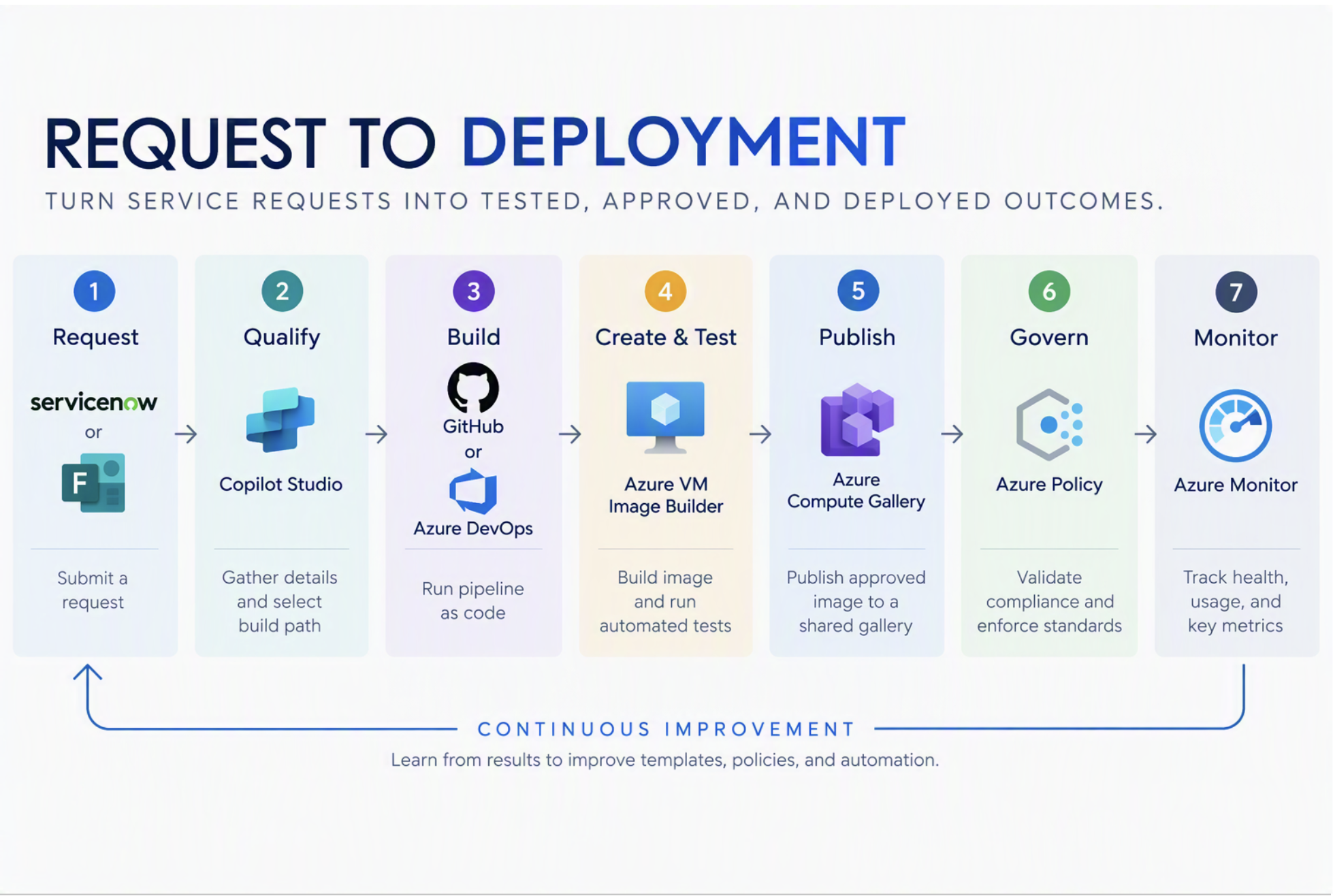
The factory may return to an earlier stage when a test fails, or an approver requests a change. A failed test should stop a release, preserve the results, and route the work back to the appropriate build step.
Applying The Model To Virtual Machines & Beyond
Microsoft’s reference architecture for virtual machine compliance follows this general model. Azure VM Image Builder customizes an image, automated tests validate it, failed images return for repair, and approved images are published through Azure Compute Gallery. Azure Policy can then evaluate compliance and restrict provisioning to approved images.
The same pattern can extend beyond virtual machines. Products may be servers, application packages, endpoint configurations, containers, development environments, or complete application deployments.


Build The Platform With The Tools You Already Own
Most organizations already have several pieces of the factory:
- Request and workflow management
- Source control and infrastructure-as-code frameworks
- Build, packaging, image, and deployment tools
- Artifact repositories
- Policy, identity, and security controls
- Monitoring, workflow, and agent platforms
What is often missing is a consistent way to connect these tools, capture logs, and manage approvals.
Canonical, for example, documents an Azure golden-image pipeline that uses GitHub Actions and Azure VM Image Builder. The supporting implementation creates an identity, role, image gallery, image definition, and image template, then automates repeated builds from the template. The resulting factory is assembled from connected services.
Start with a request pattern that occurs often enough to matter. Map its inputs, decisions, tools, tests, approvals, outputs, and delays. That map will show which steps can become reusable platform services.
A Virtual Desktop Image Workflow
A virtual desktop image request could become an initial production path:
- A ticket requests an operating system, application, or security change, and intake verifies the owner, image family, source, users, urgency, and test requirements.
- The platform selects the approved image definition, creates the proposed change, and runs the image pipeline.
- Automated tests check health, application launch, security controls, performance, and required agents.
- The completed image and evidence wait for approval, then enter a pilot ring before wider deployment.
- Monitoring tracks adoption, failures, rollbacks, and support incidents.
Infrastructure and application paths can use the same intake, evidence, approval, and measurement services while invoking different build engines.
Core Factory Components
Request Intake
The intake layer records the outcome, environment, owner, sensitivity, urgency, and required approvals. An agent can classify the work, flag missing details, and recommend an approved path, but should not invent required values or make consequential assumptions.
Source Control
Build definitions, configuration, scripts, policies, and tests should be versioned so teams can trace outputs, identify failed changes, and rebuild a known state.
Infrastructure & Image Definitions
Approved modules, image templates, packages, policies, and deployment manifests provide consistent starting points. Controlled variations should enter source control, pass the same tests, and produce versioned artifacts.
Orchestration
Orchestration connects intake to build services, tracks dependencies, handles failures, and routes consequential decisions for approval. Intake may use low-code workflows or Copilot Studio, while complex builds may run through Azure services, GitHub Actions, Azure DevOps, or existing automation.
Automated Testing
Every supported path needs tests matched to its output. Image pipelines may verify health, application launch, security, performance, and management agents. Infrastructure builds may test policy, identity, logging, backup, and connectivity. Application pipelines may test code, integrations, security findings, deployment, and rollback.
Tests should travel with the build definition. When generative AI changes a configuration, package, script, or application, it can also propose tests, giving DevOps professionals new ways to improve automation and quality assurance.
A CircleCI report analyzed more than 28 million continuous integration workflows and found that average workflow throughput increased 59% year over year. The gains were concentrated among top performers, while the median team increased throughput by only 4% and the bottom quarter recorded no measurable increase. The report identifies validation, integration, and recovery as the constraints that separate generated activity from dependable delivery, meaning that more changes do not automatically improve delivery. Without faster validation, integration, and recovery, additional output can simply create a larger queue of work awaiting proof of safety.
Generating a change is becoming easier. Demonstrating that it is safe remains the harder engineering problem.
Artifact Management
Every production run should preserve enough evidence to explain and reproduce the result:
- The request, requirements, and selected build pattern
- Source, configuration, and generated change versions
- Build logs, test results, and policy decisions
- Approval and exception records
- Released artifacts, deployment details, and rollback information
This record helps support teams diagnose failures and gives security and audit teams evidence without reconstructing the process across disconnected tools.
Approval Gates
Approval gates should be limited to decisions that require accountable human judgment. Each gate should define:
- The decision being made
- The evidence required to make it
- The person or role authorized to approve it
- The action the platform takes after approval or rejection
Reviewers can revise a plan, approve an exception, or return the request. The platform records the decision and reruns applicable tests, allowing the central team to govern patterns, policies, evidence, and exceptions without operating every request.




Put Generative AI Inside The Factory
Generative AI can support the factory in several ways:
- Interpret requests and collect missing details
- Classify work and select an approved build path
- Generate or update code, definitions, and tests
- Analyze failures and recommend remediation
- Prepare approval evidence and update the request record
- Identify patterns across failures and exceptions
These actions belong inside the production system, where source control, access restrictions, tests, policy checks, approval gates, and logs govern the work.
Adoption has outpaced operating maturity. The 2026 State of DevOps Report for Platform Engineering, based on a survey of 820 technology professionals, reports that 66% of organizations use AI in infrastructure workflows, while 31% report fully autonomous operations. It also reports mature governance automation in 79% of platform-mature organizations, compared with 14% of immature organizations. So, organizations that build those controls can safely automate more decisions without making the process less accountable.
Autonomy should increase by decision type, based on risk and evidence. Agents can classify standard requests and start approved builds, while production releases, policy exceptions, and untested customizations remain subject to human review.
Emergency Changes Still Follow A Process
A factory can include an accelerated path without creating an invisible bypass. The emergency route may reduce approval time, narrow testing to the highest-priority checks, or deploy first to a smaller ring. It should still record who invoked the path, why it was necessary, which tests ran, what was skipped, and when the complete validation will occur.
Alerts should make emergency activity visible. A rising percentage of emergency changes, skipped gates, or manual overrides signals a process problem. The issue may be poor planning, insufficient platform coverage, unrealistic lead times, or people learning that an exception is faster than the standard path.
Measure the pattern before it becomes the normal operating model.


Ownership Belongs Across The Business
Who owns an image after release? Infrastructure may build it. Security may define controls. Desktop engineering may deploy it. An application owner may depend on it. Finance may pay for the capacity. Support may handle the resulting incidents. The business unit experiences the outcome.
Each group contributes to platform ownership, but one owner must remain accountable for product direction and operating health. Responsibilities for definitions, controls, applications, deployment, funding, and support should remain explicit.
A published artifact without a named owner eventually becomes an unmanaged dependency. The factory should prevent release until ownership, support expectations, and lifecycle requirements are recorded.
Measure Whether The Factory Is Improving Work
Track the measures that show where requests wait, fail, repeat, or require intervention: qualification time, lead time, automated completion, manual rework, policy exceptions, deployment failures, recovery time, and support impact.
Use those signals to improve the platform. Long qualification times may indicate poor intake, frequent exceptions may reveal a missing build pattern, and repeated failures at one gate may show that feedback arrives too late.


Start With One Production Path
Choose one request with meaningful volume, a recognizable pattern, and measurable delays. Document its decisions and dependencies, identify the systems involved, write the expected tests, define the approval evidence, and connect the tools into one traceable flow.
The first path establishes reusable services for intake, source control, orchestration, testing, approvals, evidence, monitoring, and ticket updates. Later paths reuse those services with their own build definitions and tests.
Start with the systems already trusted to receive requests, store code, run deployments, enforce policy, publish images, monitor operations, and manage identity. Connect them through a clear operating model, then add technology only when the architecture exposes a real capability gap. A connected operating model can extend across infrastructure, application delivery, endpoint management, and generative AI, turning qualified requests into tested, approved, and measurable outcomes.
The ticket may still start the work, but the build queue is what makes the outcome repeatable, testable, and ready to scale.
Turn IT Requests Into Automated Outcomes
Connect existing workflows, automate repetitive tasks, and introduce AI with the governance and controls needed for reliable IT operations.

