


Learn how Microsoft’s AI tools, such as Microsoft 365 Copilot, Copilot Studio, and Azure Foundry, work together to boost productivity, build custom agents, and scale enterprise AI solutions. Discover pricing strategies and best practices for aligning AI with your business.

Microsoft 365 Copilot, Copilot Studio, and Azure Foundry Explained
Generative AI is no longer just hype– it’s here, it’s powerful, and it’s transforming the way we work. However, with all the buzz comes a fair amount of confusion. Which tools should you use? How do they differ? How do you make sure you’re unlocking real value without overspending?
If you’re trying to make sense of Microsoft’s AI ecosystem, this post is for you. Here’s the spoiler: it’s not about picking one tool. It’s about understanding the spectrum and designing a strategy that fits your business.
The Spectrum of AI Tools
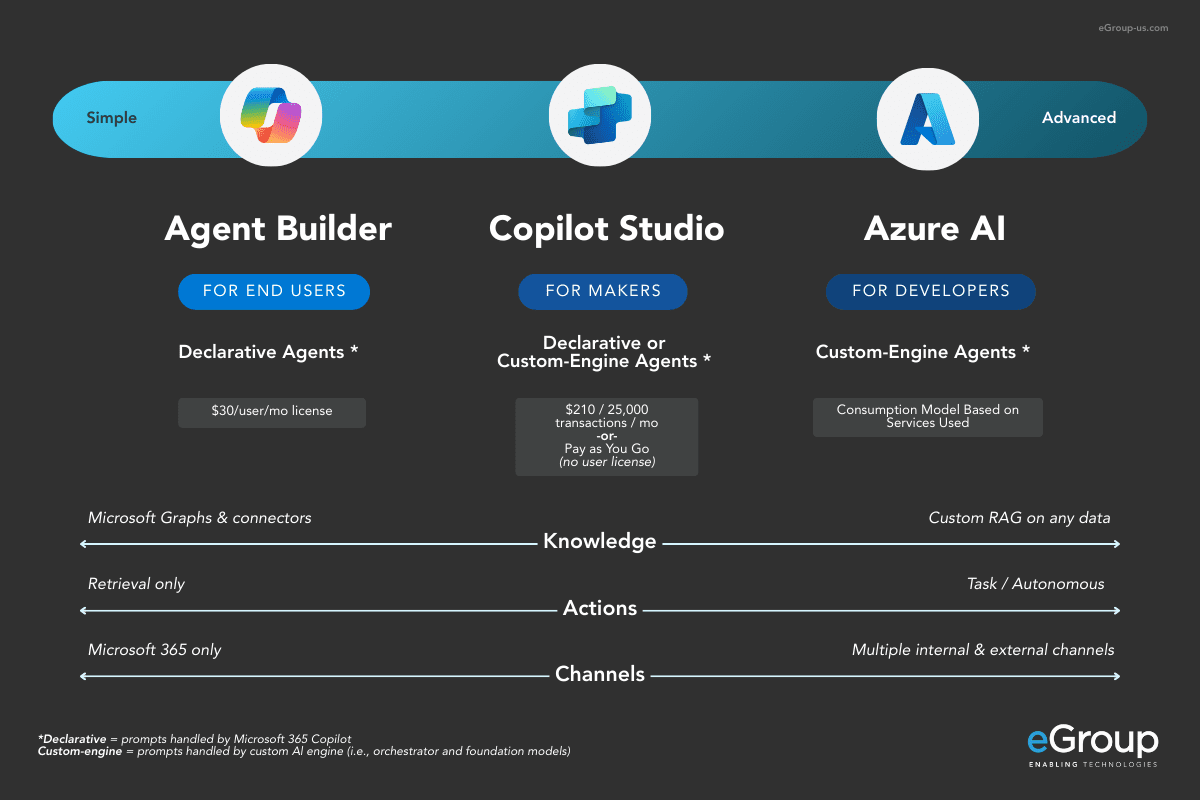
Think of Microsoft’s AI offerings as a continuum from ready-to-use assistants to fully customizable enterprise solutions.
Here’s how they break down:
Microsoft 365 Copilot: Out-of-the-Box Productivity
Microsoft 365 Copilot is your AI assistant built right into the Microsoft 365 apps you already use– Word, Excel, Outlook, and Teams. It’s license-based and designed for quick wins. With features like Copilot Chat for brainstorming and summarizing, and app integrations that help draft documents, analyze spreadsheets, and style emails, it’s a natural fit for knowledge workers, operations teams, and executives. If your day revolves around Office apps, this is where you’ll see immediate impact.


Copilot Studio: Custom Agents for Your Business
When you need something more tailored, Copilot Studio steps in. This is your custom agent builder — a platform where you can create AI agents that follow your business rules, work with your data, and stay within your guardrails. You can narrow their knowledge base, reduce hallucinations, and even automate repetitive tasks.
It’s ideal for department-specific workflows, customer service bots, or internal automation. In short, if Microsoft 365 Copilot is your generalist, Copilot Studio is your specialist.
Azure Foundry: Enterprise-Grade AI
For organizations ready to go big, Azure Foundry offers the most advanced capabilities. This is where you build scalable, sophisticated solutions that integrate deeply with enterprise data. You can create custom LLMs, leverage embeddings, and orchestrate complex workflows across systems. It’s best suited for large-scale deployments and specialized use cases where precision and control matter most.


Agents: The Real Workhorses of AI
So, what exactly is an agent? In simple terms, an AI agent is a digital entity that can take action on your behalf. It doesn’t just answer questions — it performs tasks, follows rules, and interacts with systems to get work done. Think of it as a virtual team member that never sleeps.
Agents matter because they bridge the gap between intelligence and execution. A chatbot that summarizes a document is helpful, but an agent that can pull data from multiple systems, apply your business logic, and trigger workflows? That’s a game-changer.
Here’s why agents are central to AI integration:
- Context Awareness: Agents can be trained or configured to understand your specific processes and terminology.
- Autonomy: They don’t just respond; they act — whether that’s updating a CRM record, routing a support ticket, or generating a compliance report.
- Scalability: Once built, agents can handle thousands of interactions simultaneously without fatigue.
Microsoft’s ecosystem gives you options:
- Out-of-the-box agents (like those in Microsoft 365 Copilot) deliver quick wins for everyday productivity.
- Custom agents (built in Copilot Studio or Azure Foundry) let you design specialized solutions that align with your unique workflows.
The takeaway? Agents are how you move from “AI as a helper” to “AI as a doer.”
Let’s Talk Pricing — And Strategy
Yes, Microsoft 365 Copilot costs $30 per user per month, and that can feel steep if you’re thinking about rolling it out to everyone.
Here’s the smarter play:
- Not everyone needs a full license. Operations teams, admins, and execs? Absolutely. Front-line or task-based roles? Maybe not. For them, consider deploying agents through Copilot Studio or Azure Foundry instead.
- Don’t overlook free options. Copilot Chat with Enterprise Data Protection is available at no cost and offers a secure alternative to public AI tools that might use your data for training.
Pay-as-you-go flexibility. Both Copilot Studio and Azure Foundry use consumption-based pricing, so you only pay for what you build and run. This opens the door to creative deployment strategies and better cost-to-value ratios.


Align AI to Your Business — Not the Other Way Around
The organizations that get the most out of AI don’t start with the tech, they start with their workflows.
Ask yourself:
- What do we do every day?
- What’s slowing us down?
- Where could we use a second brain?
Sometimes the answer is Microsoft 365 Copilot, sometimes it’s a custom agent, and sometimes it’s just a good old-fashioned automation flow. The point is to let your business needs drive the technology, not the other way around.
Final Thoughts: AI Integration Is an Art Form
There’s no one-size-fits-all approach to AI. It’s a blend of tools, tailored to your business and aligned to your goals. When done right, it’s transformative. So don’t just “use AI.” Design it. Shape it. Make it work for you.


Design AI That Works for You
AI isn’t one-size-fits-all. eGroup helps organizations align Microsoft AI tools, from Copilot to Azure Foundry, with the workflows that matter most.