

Microsoft Fabric includes foundational resiliency capabilities, but operational recovery still depends on planning, automation, and testing. Learn how to build a practical BCDR strategy for Fabric using Git, failover scripting, and repeatable recovery drills.
Disaster recovery gaps usually show up during an incident, not during design reviews. They surface when a region degrades, a workspace is corrupted, or someone overwrites the wrong table, and the business needs answers fast.
BCDR planning for Microsoft Fabric is no longer optional. Teams now run production analytics on the platform. Reports drive operational decisions, and pipelines feed downstream systems. Is your implementation recoverable?
What Microsoft Covers, and What You Still Own
Cloud reliability is a shared responsibility, and in Fabric, the line is clear.
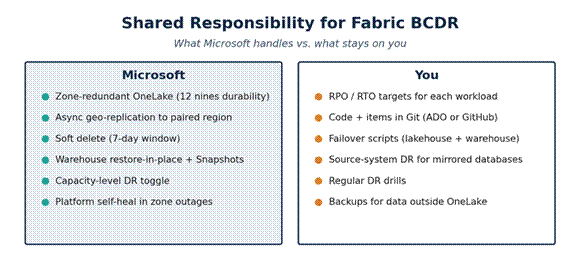
Microsoft manages the platform, including zone-redundant OneLake, asynchronous geo-replication to the Azure-paired region, soft delete, restore-in-place for warehouses, and self-healing during single-zone outages. But enabling capacity-level DR does not complete your recovery plan.
You still own the parts that make recovery work in practice, recovery objectives by workload, source code in Git, failover scripts, drills, and DR for the operational systems feeding Fabric.
If the primary region goes down, can your team recover using a tested plan, or will they have to improvise under pressure?
Many failover exercises expose the same issue. The platform functions as designed, but the surrounding recovery steps remain manual. OneLake may be replicated, but reports still need to be rebound, SQL endpoints updated, permissions checked, and downstream dependencies validated. If those steps are undocumented, recovery slows down fast.
What Fabric Gives You by Default
Start with the recovery capabilities Fabric already provides. They help, but they do not replace a recovery plan.
- OneLake is zone-redundant in regions with availability zones. Data is synchronously replicated across three zones with no action required.
- Soft delete keeps deleted files recoverable for seven days. As of last year, you can recover them through the portal – a recent feature that previously needed custom scripting. Operations teams no longer need a notebook to undo a misfire.
- The data warehouse has system-generated restore points every eight hours, retained for 30 days, up to 180 points. Restore-in-place for table-level recovery from accidental writes.
- Mirroring is available for SQL Server 2016 through 2025, PostgreSQL, Cosmos DB, and Snowflake. Mirror configuration is not replicated across regions, so during a failover, you will recreate the mirror in the secondary region. Your source database needs its own DR plan.
- Warehouse Snapshots give you a read-only point-in-time child item with 30-day retention. Useful for both recovery and reproducibility. It is not a substitute for cross-region recovery, but it is the cleanest answer to “we accidentally truncated the wrong table” that Fabric has had so far.
- Capacity-level DR replicates OneLake to the Azure-paired secondary region asynchronously. Once enabled, the setting is locked for 30 days, and replication can take up to seven days to begin. Plan for the lag.
- A pip-installable command-line interface (ms-fabric-cli) that scripts workspace and item operations directly. Combined with Semantic Link Labs, the CLI gives teams a more practical way to automate workspace and item recovery. If your DR drills are still mostly manual, this is a good time to change that.
What You Still Need to Build and Test
Most of the recovery work is still yours. If anything, the remaining gaps are easier to see now that more of the platform is generally available.
- DR is still scoped at the capacity level. There is no workspace failover, no per-item backup policy, and no read replica.
- Cross-region warehouse recovery still requires a staged process. You need scripts, sequencing, and a tested runbook before an actual event.
- Cross-region lakehouse recovery is still manual. There is no one-click failover.
- Git integration supports Azure DevOps and GitHub. Other platforms still require custom automation through the CLI or REST APIs.
Platform features help, but recovery still depends on how well you script, test, and rehearse the process. There is still no first-party disaster recovery accelerator for Fabric. For teams that need to move faster, eGroup’s Data Foundation Accelerator can help establish the baseline.
Two Good Places to Start
Make Git your source of truth. If a workspace can be rebuilt from a branch, recovery becomes far more repeatable. Connect each workspace to version control, commit regularly, and treat anything outside Git as a recovery risk.
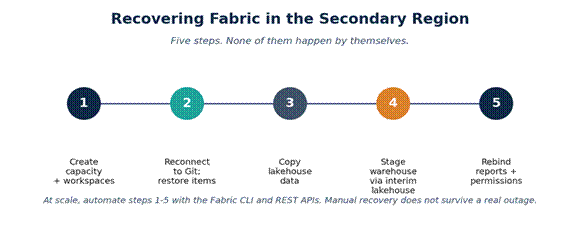
Script the failover, then test it. Use the Fabric CLI and Semantic Link Labs to automate workspace creation, Git rebinding, lakehouse data copy, and warehouse staging. Then run a quarterly drill and measure the result. If failover has never been tested, it is still an assumption.
Recoverability usually reflects the quality of your last drill.
Move from Settings to Operating Readiness
Operational readiness typically stalls because teams are busy, the platform continues to evolve, and recovery tasks remain scattered.
Treat resilience like security: as an ongoing operating discipline and not a one-time setting. The goal is to move from a capacity toggle and a slide deck to a tested and validated runbook. Go from manual recovery during a crisis to scripted failover backed by routine drills. Don’t assume “Microsoft handles it” and understand the shared responsibility. Move away from hope as a strategy for measurable RPO and RTO.
How We Help Teams Operationalize Recovery
Most teams know they need a Fabric BCDR plan. The challenge is building one, testing it, and keeping it up to date as the platform evolves.
eGroup helps teams turn Fabric recovery into a tested operating model. We clarify the shared responsibility line, automate the recovery playbook with the Fabric CLI and Semantic Link Labs, and run drills that measure how recovery performs in practice.
If your team is relying on platform settings without a tested runbook, start with three questions: What are your recovery targets? What can you rebuild from Git? When did you last run a drill? If those answers are unclear, that is where to start.

Validate Your Fabric Recovery Strategy
Build a tested Microsoft Fabric BCDR operating model with automation, recovery validation, and repeatable failover procedures.
