


When multiple campus buildings share one civic address, Microsoft Teams needs more than a generic floor designation to provide a useful emergency location. Learn how to structure emergency addresses and places so each building can be clearly identified.


Introduction
If multiple buildings share one street address, the Teams location value needs to include enough detail for emergency personnel to distinguish one building from another. In practice, that usually means including the building name in the Teams Location record, not only in the Emergency Address description.
The Emergency Addresses defined in Microsoft Teams are used to help direct First Responders to 911 callers. The addresses for the organization’s buildings are comprised of the school or company’s name, a description, its street address, and geocodes. Geocodes are the latitude and longitude of the location. The locations in a building are also defined. These are usually a floor, a geographic section of a floor, or an individual room.
When a 911 call is placed, the organization’s name, building’s address, geocodes, and the location of the caller in the building are passed to the Public Safety Answering Point (PSAP) and First Responders. The description of the building is not passed. This is usually not a problem. After all, Acme Rockets Inc.,10 Main Street is Acme Rockets Inc., 10 Main Street! But what if your organization exists on a campus with more than one building and all the buildings have the same street address? Many college and university campuses, and some K-12 schools and private schools, fall into this category. This is what we are discussing in this article. The discussion is equally applicable whether you’ve installed Teams Voice using Calling Plans, Operator Connect or Direct Routing.
Note:
This article assumes you are familiar with setting up Teams Dynamic 911. Please download our Teams Dynamic 911 eGuide if you are not.
Background
The Teams Emergency Address’s description field is purely for the benefit of the Teams administrator. It can be used to add a note or reference to the record. Like most description fields in the Microsoft software world, its use is completely optional.
Using it for Teams Emergency Addresses is extremely helpful. We recommend using it to serve as a clear identifier for an address. Putting the name of the building associated with the address in this field makes identifying the addresses simple. Some clients will put a three (3) letter acronym in for the building or an organizationally defined building number in addition (or instead of) a name for the building.
It’s important to understand that the value in the description field is not passed to the PSAPs or First Responders. It is only a reference for the Emergency Addresses in Teams.

Campuses With Specific Addresses For Their Buildings
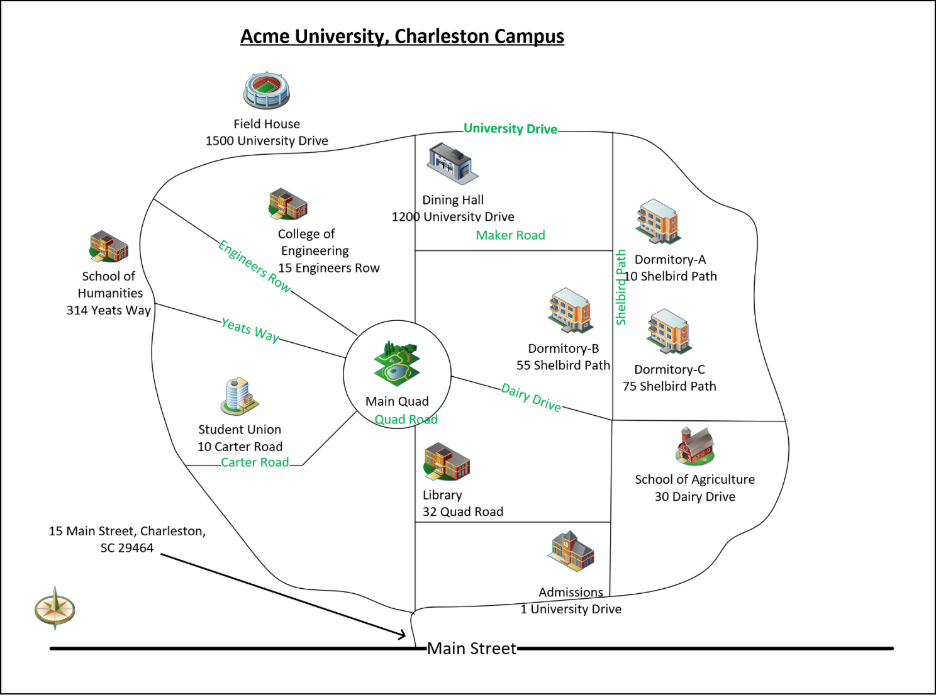
Many private schools, (K-12) school districts, colleges, and universities in the United States have specific addresses for all of their buildings. These work well when defining Teams Emergency Addresses and locations. Every location in every building will be unique. By way of a theoretical example, the street addresses for every building at “Acme University”, pictured below, are unique:
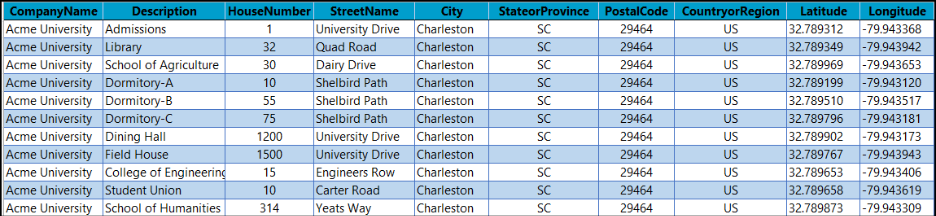
The Teams Emergency Address Records for the buildings would be (The “HouseNumberSuffix”, “StreetSuffix”, “PreDirectional,” and “PostDirectional” fields have been omitted for clarity):
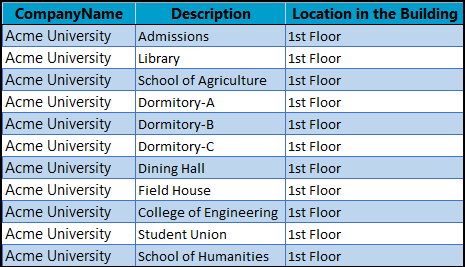
For simplicity, let’s assume that each of these buildings only has a “1st Floor”. We would then add these Teams Location Records:
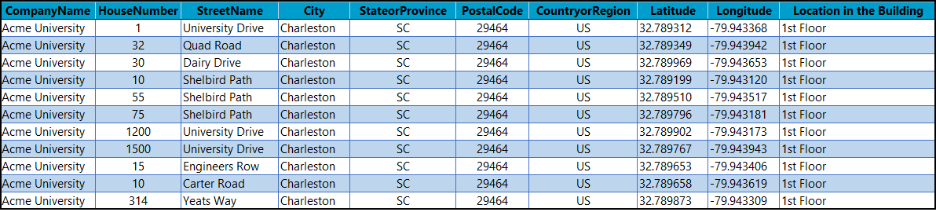
Teams will send a combination of the Emergency Address and location information to the PSAP and First Responders during a 911 call. This results in unique and specific records being sent for the “1st Floor” location in each of the university’s eleven (11) buildings. This information can clearly guide the First Responders to the 911 caller’s location on the campus:
Single Address Campuses
Some campuses have a single street address for all their buildings. Either one or none of the buildings on these campuses has a specific address that can be provided when placing a 911 call.
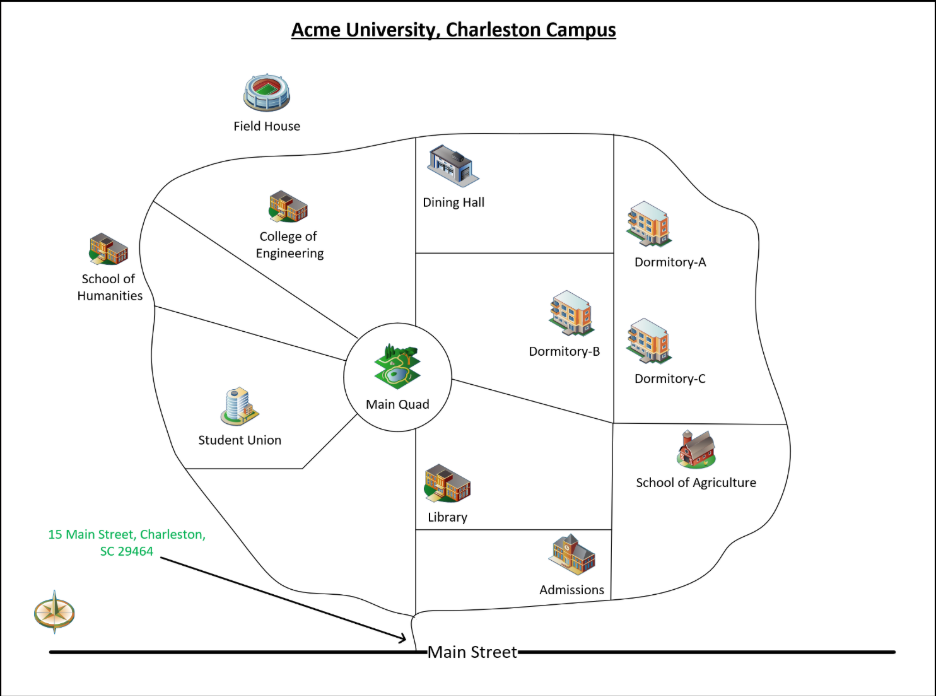
In this example, the street address for every building at “Acme University”, pictured above, is:
15 Main Street
Charleston, SC 29464
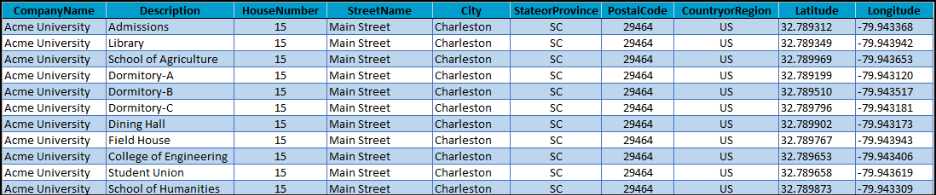
The Teams Emergency Address Records for the buildings would be:
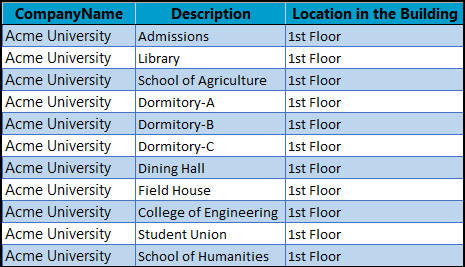
We again assume that each of these buildings only has a “1st Floor”. We would then add these Teams Location Records:
Teams will again send a combination of the Emergency Address and location information to the PSAP and First Responders. The problem is that Teams does not include the “Description” field. This will result in ambiguous information being provided. (The First Responders may not look at the geocodes to help locate the building):
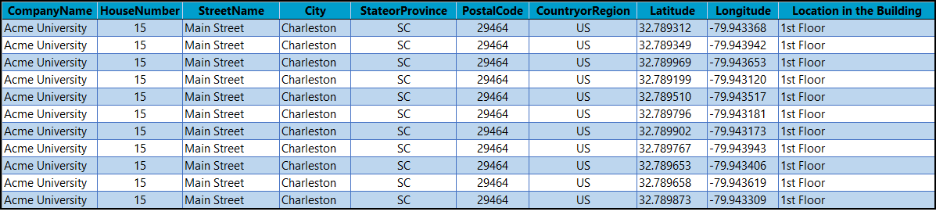
This information will make it nearly impossible for campus police and the First Responders to find the location of the 911 caller. Clearly, better information needs to be provided to the First Responders.
Solution
The solution we have recommended to our single-address customers is to include the name of the building in the “Location” field of the Teams Location Record. The First Responders should have a map of the campus that will allow them to find the specific location by referring to the building name. Many colleges and universities have a Campus Security or Police force. They will easily be able to refer to the building name in the information to locate the caller.
In our example, each of the “1st Floor” locations in the buildings now includes the building name:
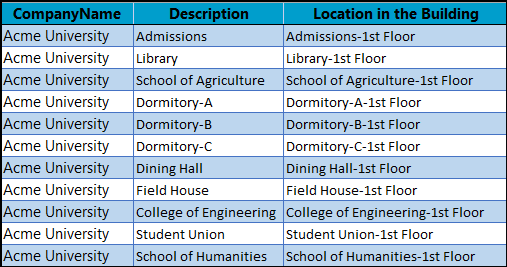
These can now provide unique and unambiguous location information to the PSAP, campus police, and First Responders:
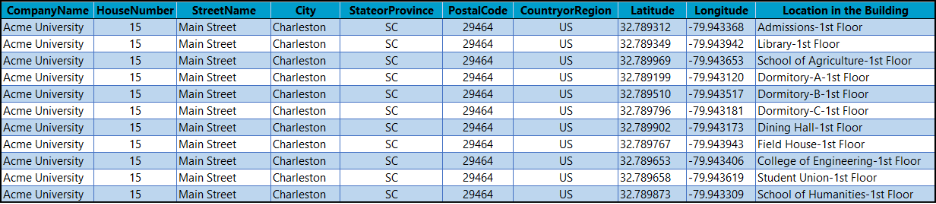
The addition of the building name to the “Location” field wouldn’t be a bad idea for campuses with unique building addresses! The more information you can provide to Campus Police and the First Responders, the better!
Colleges and Universities with Multiple Campuses
Some schools have campuses at different geographic locations. These “sub-campuses” tend to have fewer buildings than the main campus. To make the Teams Administrator’s job easier, adding a campus identifier to the Emergency Address’s “Description” field can be a big help. We have several educational customers who fall into this category.
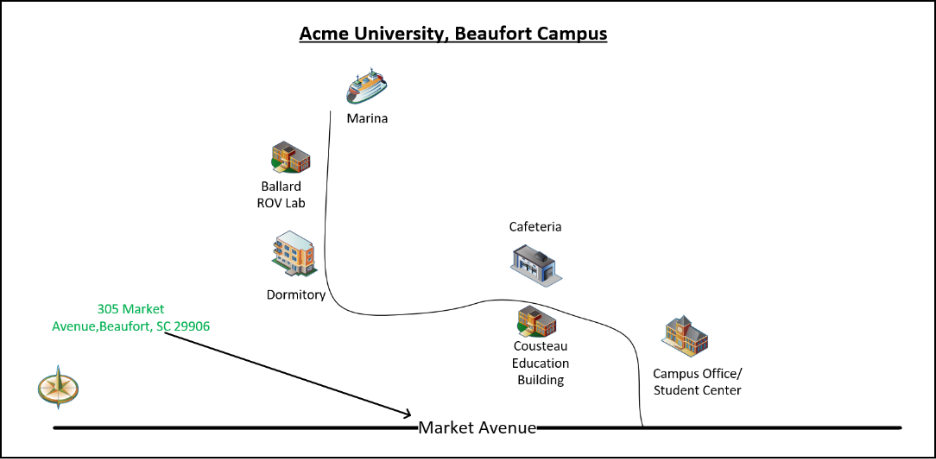
Now our “Acme University” has campuses in Charleston, Columbia, and Beaufort, SC:
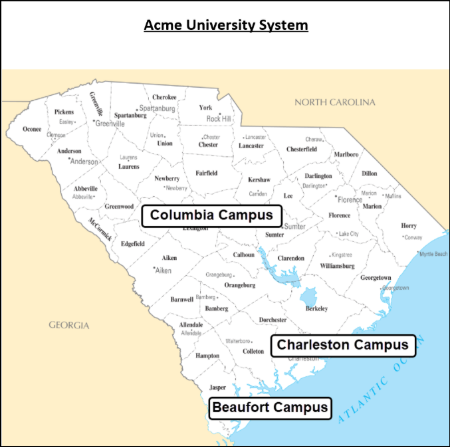
Like the Charleston campus, the additional campuses only have one (1) address each for their buildings:
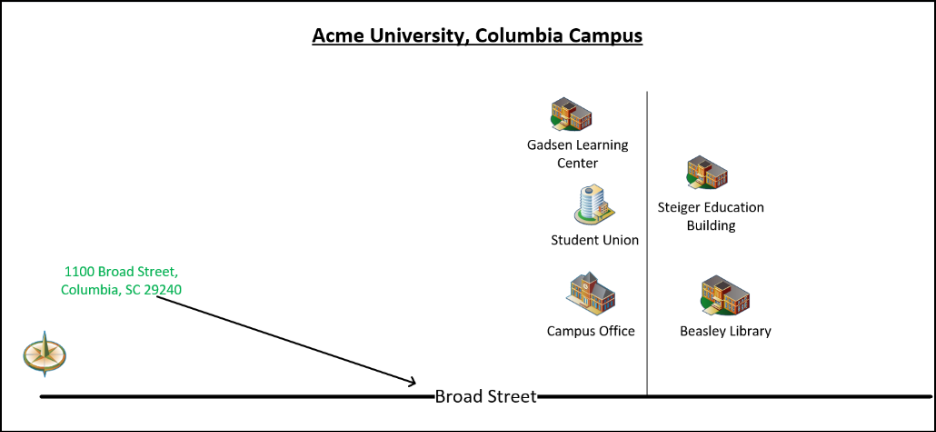
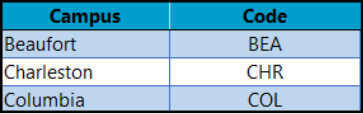
In this example, we are also going to define a 3-letter acronym for each campus:
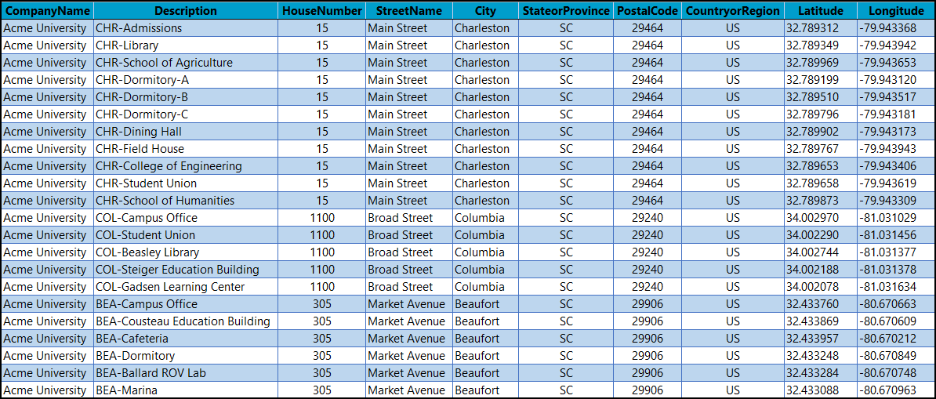
The Emergency Addresses for all buildings in the system now include the acronym in the “Description” field:
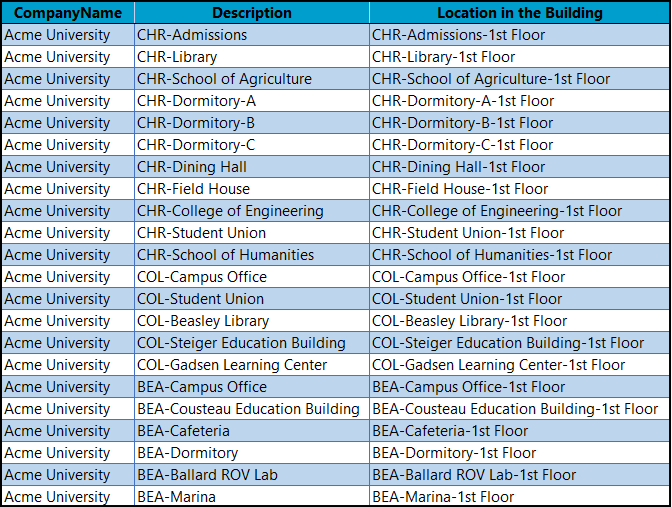
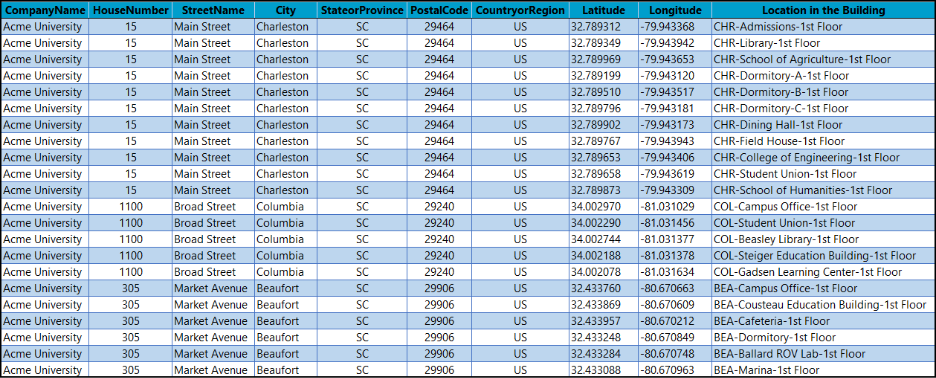
Once again, we assume that all the buildings only have a single floor, resulting in these Teams Location Records:
These will produce precise location information for the PSAP and First Responders:

Summary
It is vital that the Public Safety Answering Points (PSAPs) and the First Responders receive a clear and unambiguous address and location when someone dials 911. It may be cliché, but sending inaccurate information could make the difference between life and death. Educational campuses that do not have individual street addresses for their buildings do not lend themselves to producing clear and unambiguous addresses. There are a few simple guidelines that you can follow to configure Microsoft Teams Dynamic 911 to deliver valid and accurate locations when a Teams user dials 911. This guidance also applies to any organization with a campus infrastructure that has a single street address for all its buildings.
For more information, please download our Microsoft Teams Dynamic 911 Compliance Guide. This is a virtual “bible” of everything that you need to know to successfully deploy Microsoft Teams Dynamic 911and comply with Kari’s Law and the RAY BAUM Act.
eGroup is available and ready to answer any questions that you might have about Microsoft Teams, Teams Voice, Teams Dynamic 911, and Teams Devices. If you need help with implementing or migrating to Microsoft Teams or Teams Voice or upgrading your devices, reach out to us.
Make Campus E911 Locations Clear
Validate your Teams emergency addresses, places, network mappings, and call-routing design before an emergency exposes a location gap.

