

Classroom phones are becoming a standard requirement for K-12 schools, colleges, and universities planning Microsoft Teams Phone deployments. This article compares three implementation models, including native Teams phones, SIP Gateway phones, and SBC-based classroom phone designs.

For educational institutions, K-12, and Higher Education, one of the trickier facets of their Public Switch Telephony Network (PSTN) installation is classroom phones. Today, it has become a necessity to have a telephony device in every classroom.
Educational institutions have many different use cases or personas that must be accounted for when implementing Teams Phone– classroom phones are one of these. They have fewer functional requirements than their counterparts found in the school district offices and the non-academic offices in colleges and universities.
However, it can be argued that they have a higher requirement for reliability or survivability than other devices in the organization. Cost and administration are two (2) of several factors to evaluate when planning for the installation of these phones.
Why Classroom Phones? What Is the Use Case?
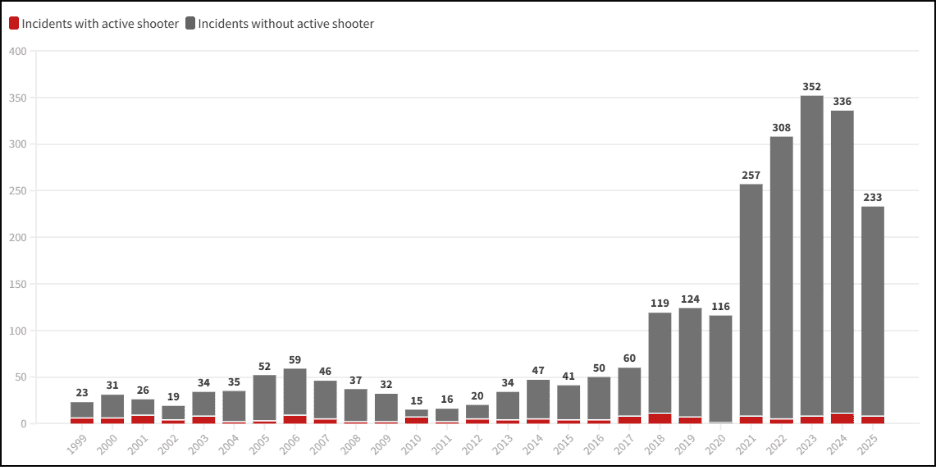
Unfortunately, the chance of an active shooting incident is the most common reason for installing phones in every classroom at an educational institution. Names like Columbine, Sandy Hook, Marjory Stoneman Douglas, Virginia Tech, and Robb Elementary have become parts of our vernacular. Since 1999, there have been 2,522 gun-related incidents at K-12 schools in the United States. 154 were active shooting incidents. Since the 1960s, there have been seventeen (17) incidents at colleges and universities.
911 can be dialed from classroom phones. They also provide:
- Two-way communication with the Public Safety Answering Point (PSAP) and the first responders.
- The exact location of the caller.
- Real-time notification when someone dials 911.
Classroom phones are primarily implemented to facilitate 911 calling. They can be configured to allow other calling types such as intra-school/building calling, inter-district/ campus calling, local number dialing, toll-free number dialing, etc.
There are currently no state or federal regulations that require telephones to be in classrooms. They are becoming a de facto standard to ensure the safety of students, faculty, and staff in the schools. There has been some movement to improve the safety of classrooms.
Florida, Georgia, Virginia, New Jersey, New York, and Texas have enacted Alyssa’s Law. This requires that schools install silent panic alert systems that connect directly to law enforcement. In the last few years, every Teams Phone project at educational institutions taken on by eGroup has included requirements for classroom phones.
What Teams Phone Options Are Available for Classroom Phones?
There are three (3) ways to provide PSTN dial tone to Teams users:
- Calling Plans
- Pooled minute plans.
- Pay-as-you-go plans.
- Operator Connect
- Direct Routing
We are not going to discuss the general advantages and disadvantages of each of these options. The classroom phones usually don’t have a significant effect on which of these options is chosen by the educational institution. Realistically, thought should be given on how to provide dial tone to classroom phones when the organization is determining the best overall Teams Phone option.
There are no rules that state that the “flavor” of Team Phones chosen for the district office, non-academic collegiate offices, faculty and staff phones, and other devices at the educational institution must be the same one used for the classrooms. Administratively, it is simpler to use a single solution for all, but it is not a requirement. If an organization has decided to use Direct Routing as their solution, they will typically also use it for the classroom phones.
In general terms, Calling Plans and Operator Connect, when compared to Direct Routing, are:
- Easier and less costly to implement.
- Easier to maintain.
- Cloud-based with limited to no requirement for on-premises equipment.
- Highly dependent on reliable and redundant internet connectivity to all the organization’s buildings, campuses, or locations.
- Less flexible in complex telephony configurations.
- More challenging when an organization is using Teams for some of their telephony and using an on-premises Public Branch Exchange (PBX) or other hosted solution for the rest of their requirements.
The solution chosen by an organization for classroom phones must meet their needs and balance costs, administrative and maintenance requirements, and other factors.

Options for Installing Classroom Phones Using Teams Phone
An example environment will be used to describe the more common options for integrating classroom phones into a Teams Phone deployment. There are some MSRP prices listed/used in the example. All prices are for example purposes only and do not represent actual costs, which will vary based on how services and products are purchased, volume agreements, location, and other factors.
Example Scenario
A University has 200 non-academic office workers and 500 classrooms. They have decided that their Teams users and Shared Device (Common Area Phone) accounts will have a Native Teams Phone, like the Poly CCX 400. Each user will have a Microsoft A5 and Microsoft Pay-As-You-Go Calling Plan license.
Option 1: Teams Native Phones With Shared Device Licenses
- This option is the easiest and fastest to install. It requires minimal additional administrative and support training for the organization’s staff. It is the most consistent with the university’s overall Teams Phone deployment.
- All 500 classrooms will have a Poly CCX 400.
- The MSRP for the Poly CCX 400 is $399.95.
- The 500 phones for the classrooms cost $199,975.
- Annual Maintenance for the phones, including advanced hardware replacement, is about $32.55/device.
Total annual maintenance is $16,275.
- The school will create 500 Entra accounts, one for each classroom, and assign each a Teams Shared Device/Space license.
- The Teams Shared Device/Space license is $8.00/month.
- The monthly cost of 500 licenses is $4,000, and annually $48,000.
- Pay-As-You-Go licenses will not be purchased for these accounts as they will leverage Teams Shared Calling.
- Professional services will cost at least $16,000.
- The first year’s total cost of ownership (TCO) would be $280,250.
- Subsequent years would be $64,275 annually for licensing and maintenance.

Option 2: SIP Phones Through the Teams SIP Gateway
- This option is a bit more challenging than the first to install due to the use of the Teams SIP gateway. It will require some additional administrative and support training for the organization’s staff. The solution is slightly different than the Teams Phone deployment for the rest of the organization.
- Instead of purchasing CCX 400s for the classrooms, they will purchase Poly Edge E100 phones.
- The MSRP is $171.95. 500 Edge E100s would cost $85,975.
- These are OpenSIP phones, not Teams Native Phones.
- Annual Maintenance for the phones, including advanced hardware replacement, is about $32.99/device. Total annual maintenance is $16,495.
- These will be connected to Teams through the Teams SIP Gateway.
- The user experience when making calls on the Edge phones is not the same as the CCXs, but these will only be used to make 911 calls, negating any difference in the phone interface!
- The user experience when making calls on the Edge phones is not the same as the CCXs, but these will only be used to make 911 calls, negating any difference in the phone interface!
- The Teams licensing for the accounts signing onto these phones will be the same, $48,000 annually.
- Professional services would cost at least $20,000.
- The first year TCO is $170,470 for this option.
- Subsequent years will be $64,495 annually for licensing and maintenance.
Option 3: SIP Phones Registered to On-Premises SBCs
- This option is the most challenging to implement. The use of SBCs, SIP trunks, and the need for ERSP integration increases the degree of difficulty. It avoids the need to create Entra accounts and provide licensing. The configuration of dynamic 911 for these phones will require more effort than either of the other options. It will require additional administrative and support training for the organization’s staff on the care and feeding of the SBCs, SIP trunks and ERSP integration. It will be significantly different than the Teams Phone deployment for the rest of the organization.
- With this option, we will not be signing the Edge 100s in as Teams users. They will register with a pair or more of Session Border Controllers (SBCs).
- We will use the AudioCodes low capacity Virtual Edition (VE) SBC in this example. AudioCodes does not charge for the purchase of this SBC. There is a cost for the VE’s annual support and maintenance. Two (2) SBCs are implemented to provide resiliency for the solution. SIP trunks from a telephony provider will be added to each SBC.
- An assumption is made that the SBCs and SIP trunks will be configured to support 500 concurrent outbound calls. We want all the classroom phones to theoretically be able to dial 911 simultaneously. Each SIP trunk will be able to support 500 concurrent inbound/outbound calls.
- The initial acquisition of the SBCs, licenses, first year maintenance, and 911 Emergency Service Response Provider (ERSP) is about $34,200.
- Annual support and maintenance charges for the SBCs would be at least $5,810.00.
- The SIP trunks are billed by the number of concurrent channels.
- We are using a monthly per-channel cost of $10.
- The 1,000 channels available on both SIP trunks would cost around $10,000/month or $120,000 annually.
- The ERSP charges $0.75 per device/month or $375/month for 500 classroom phones. This works out to $4,500 annually.
- Entra accounts and Teams licenses would not be needed for the classroom phones.
- 500 Poly Edge E100 phones SIP phones will be purchased.
- The MSRP is $171.95. 500 Edge E100s will cost $85,975.
- Annual Maintenance for the phones, including advanced hardware replacement, is about $32.99/device. Total annual maintenance is $16,495.
- The phones would register with both SBCs, for redundancy.
- Professional services will cost at least $32,000.
- The total first-year TCO would be at least $298,980.
- Annual costs for the SIP trunks, ERSP service, and SBC support and maintenance would be $146,805.

Cost Summary & Comparison


Summary
Classroom phones have virtually become a necessity for all educational institutions. They provide the ability to reach PSAPs and first responders from any classroom in the event of an emergency. They also allow emergency personnel and providers to call directly back to the classroom if needed.
There are several options available for implementing these phones. The best option is the one that meets the needs and requirements of the school district or college/university. The requirement for resilient access to the internet for every classroom is consistent across all the options.
eGroup is available and ready to answer any questions that you might have about Microsoft Teams, Teams Phone, and Teams Devices.
If you need help with implementing or migrating to Microsoft Teams or Teams Phone or upgrading your devices, reach out to us.
Plan Your Teams Phone Strategy For Education
Need help designing classroom phones, E911 routing, Teams Phone licensing, devices, and long-term support? eGroup can help you evaluate the right Microsoft Teams Phone approach for your school, district, or campus.