


Microsoft is redesigning Copilot around Home, Code, and Autopilot while adding deeper Office integration, new data capabilities, and usage-based AI experiences. Here are the 10 changes IT and business leaders should understand before the rollout reaches their organization.
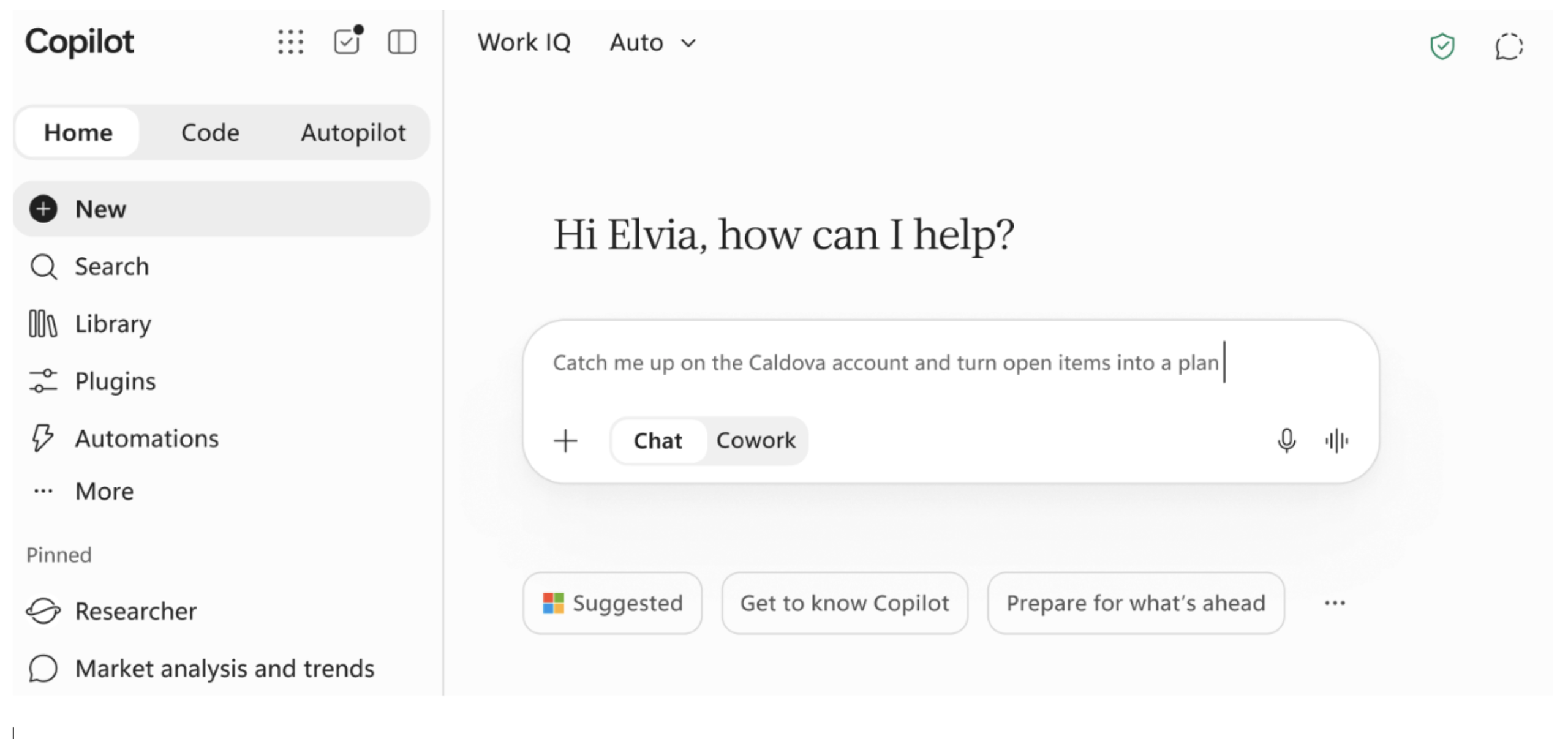
1: “Home” Is Where The Chat Happens
Copilot will now have three tabs, each providing a unique set of capabilities for users. The default tab is called “Home” and provides access to the traditional chat and Cowork experiences. For all intents and purposes, nothing much on the surface has changed and most users will still feel at “home”, chatting with Copilot’s models. Chat is still covered by your Copilot license and Cowork is consumption based.
2: Productivity App Integration
Word, Excel and PowerPoint will now be fully integrated with Copilot Chat, allowing users to create and edit their documents inside of Copilot. No need to switch to the productivity apps. This should provide a more seamless experience.
3: “Code” Embraces Citizen Development
Alongside the “Home” tab, users will now see a “Code” tab. This tab opens a prompt where users can create and share custom built apps and workflows with others in the organization. The functionality is powered by GitHub Copilot, and the output is full-blown professional code apps, not Power Platform apps. Designing, building and using these apps will be billed on a consumption basis using Copilot credits.
4: Put Yourself On “Autopilot”
Known as “Scout” during the pilot phase, the personal assistant functionality has been rebranded to “Autopilot”. This is the third tab in the new Copilot interface. Your Autopilot allows you to stay engaged in chats, follow up on tasks on your behalf and can even be chatted with by others in your organization, being a proxy for you across the Microsoft ecosystem. This always-on assistant will be billed on a consumption basis using Copilot credits.
5: Consumption & Credits & Bills, Oh My!
The standard chat and productivity app integration is paid for via a per user license, or user subscription license (USL). The chat experience still provides multiple models (a unique feature exclusive to Microsoft Copilot). All other features including Cowork, Code and Autopilot will be billed on a consumption basis, using up Copilot credits. This is referred to as Usage-based Billing or UBB for short.
6: Finance Teams Rejoice In New Cost Management Tools
Microsoft is introducing new FinOps functionality that helps both administrators and users track their AI spend. Administrators can selectively enable consumption-based tools and allocate budgets to organizations, groups and even individuals. New reports and tools allow for easier charge-back of AI costs to business units. Users will be able to track their credit consumption via a new usage dashboard. They can even request additional credits via the dashboard interface.
7: Copilot’s Brain Gets Bigger
Copilot is getting smarter. Microsoft is providing more out-of-box integrations, specifically with Fabric semantic models. Fabric IQ, as it’s called, allows Copilot to tap into Power BI semantic models, bringing the idealized “chat with your data” ever closer to users. Note, however, that this implies that you have a well-structured semantic layer (“Gold” layer) in your data architecture. Data modernization projects that consolidate, cleanse and structure your data are going to take on even more importance.
8: Governance, Governance, Governance
With great power comes great governance. IT departments will need to spend more time with business teams to determine which of these new capabilities should be deployed to which users and teams. Costs will need to be modeled via the new calculators and budgeted for. With regards to the “Code” functionality, IT teams will want to implement code review and publishing standards. Microsoft rejoices in the ease of sharing apps, but every IT department will want to control the underlying environments and functionality, putting controls around IT sprawl.
9: Where, Oh, Where Did My New Copilot Go
Where do you find all of these features? Microsoft is rolling them out via the Frontier Program and Private Preview over the next 4 to 6 weeks. The goal is to have all of the functionality generally available by Ignite in November…with even more new features being teased. You can opt into the Frontier program for free and limit access to a subset of users. Consider providing access to IT testers and power user early adopters in your organization. Just make sure to put the cost conrols in place first.
10: Reinvent Your Work
Microsoft’s message that Copilot is “THE AI built for work” resonates throughout this announcement. Outside of chat, all the new features force users and teams to reevaluate how their current work is being done. This isn’t just a simple tool but rather an interconnected suite of functions that change everyday processes. In order to get the most value out of these tools, teams should examine their processes from start to end and evaluate how automation, new apps and agents (the digital workforce) re-image their work.
We will be following up with more pointed updates as they become available. Reach out if you want to talk through the features and discuss how you can best prepare for this new wave of Copilot, no, AI at work, functionality.






If you need to kickstart your AI initiatives, consider the following offerings:
A Technical Note on Context Windows
| Service | Overview |
|---|---|
| Agentic AI Governance | Set up a comprehensive governance model that includes people, process and tool governance. Your agents will be identified, understood and effectively monitored and your users will be given access to the tools that they need in a cost-effective way. |
| Agent In A Box | Want to enable your first digital worker and see how to add value to your organization? Our Agent in a Box engagement designs and deploys a working agent, addressing a specific use case that you bring to the table. You will learn how to build an agent in a safe and governed way. |
| Copilot Studio Training | Want to scale your agent development skills? Our Beginner, Intermediate and Advanced training courses help you understand the differences in the Copilot Studio harnesses and enable you to build agents, ranging from simple retrieval chat agents to autonomous agents integrated with your business systems. And, as a bonus, training participants get four post-training office hours where they can ask questions and get further guidance as they start to explore their new skills. |
| Copilot Adoption Enrichment | Have you deployed Copilot but are not seeing the desired adoption numbers? Are your users in need of training that is better aligned with how they work? Our Adoption Enrichment training focuses on persona-based training, helping users adopt Copilot’s features in a way that aligns with their work. |
What IT Leaders Should Do Now
Don’t treat this as just another Copilot interface update. Start identifying which users should have access to consumption-based capabilities, how Copilot Credits will be budgeted and monitored, and what governance standards will apply to new apps, agents, and automations. At the same time, evaluate whether your data foundation and adoption strategy are ready to support these new experiences.

Prepare for the New Copilot
Home, Code, Autopilot, and consumption-based AI create new decisions around governance, cost, data, and adoption. eGroup can help you build the foundation to deploy these capabilities responsibly.
Visit our Accelerate With AI page to explore proven frameworks, governance services, adoption programs, and hands-on engagements designed to help your organization move from AI experimentation to measurable business value.
