


Endpoint management priorities are converging around patching, provisioning, privilege control, attack surface reduction, and BYOD security. Here is how IT leaders can turn five separate challenges into one coordinated Microsoft endpoint strategy.
We asked a simple question during our recent Microsoft Virtual Roadshow:
“What’s your next endpoint challenge to tackle?”
Multiple answers were allowed from the five options, and in short, organizations seem to want to work on everything, but can’t all at once.
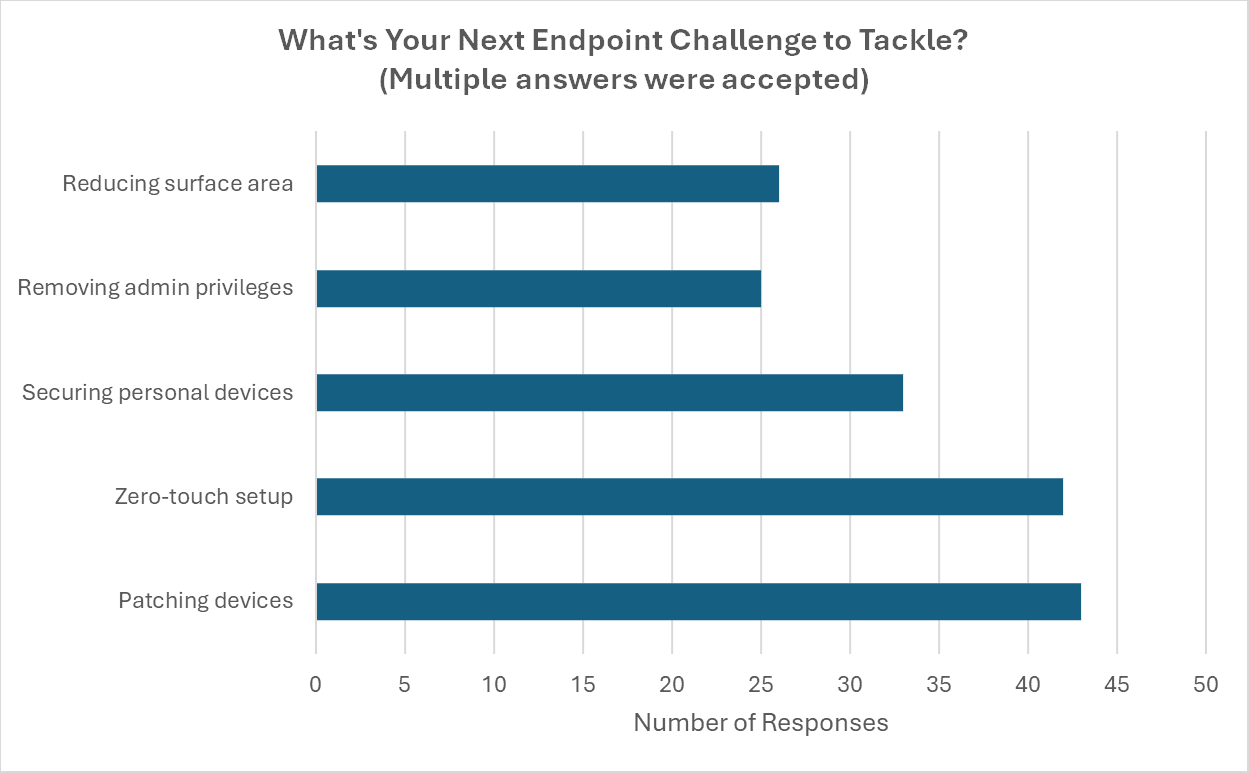
The priorities balance pay respects to user experience, security posture, and importantly, limited IT operational bandwidth.

Executive Summary
These five areas are actually connected, and in some ways compound.
- Weak patching undermines everything else
- Poor device onboarding creates inconsistent baselines
- Too many local admins expands the attack surface
- Surface area reduction works best when the other controls are in place
- BYOD without data protection introduces unmanaged risk
So, execs have a real opportunity to treat these as a coordinated endpoint strategy rather than five separate initiatives. Microsoft keeps making advancements in Intune and Windows Autopatch to facilitate that journey.
Outlines for each of the five areas come next.
1. Patching Devices (Top Vote)
No surprise here, our old friend patching came out on top. Keeping devices updated without chasing users has been a thorn in IT’s side for… well, forever.
- For the Operating System:
Windows Autopatch is automating the heavy lifting of patch compliance, targeting 95% of devices by their compliance date with minimal manual intervention. For teams juggling endpoint challenges (like we saw in the poll results), this means less time chasing users for reboots and more time focusing on higher-value work. If your org hasn’t explored Autopatch yet, now’s a great time to pilot it (especially if you’re still managing the transition from Windows 10).
Even more exciting is where this is heading. Microsoft is pushing hotpatching, which applies security updates without requiring a restart.
Until then, use the recently released CVE/KB Reporting for visibility into which vulnerabilities each update fixes, how severe they are, and which devices are still exposed. This answers the ever-concerning CISO question, beyond “did the patch install?” to “are we actually protected?”
- For apps, Microsoft is:
- Rolling Enterprise App Management into the M365 E5 sku. This emerging capability effectively deploys and patches Win32 apps that are available in the Microsoft Store.
- Simplifying the number of deployment rings (for unmanaged devices). They’ll be eliminating the Semi-Annual Enterprise Channel as a selectable option for new deployments in tools like Office Deployment Service, effectively merging SAEC into Monthly Enterprise Channel (MEC) starting July 14, 2026. There’s no change in this channel when devices are managed via Intune, though.
Microsoft Learn resources


2. Zero-Touch Setup
This came in just behind patching. It makes sense, since when devices don’t start in a known-good state, everything else becomes reactive. Case (study) in point, a user at a law firm unboxed a new laptop without Windows Firewall running, and quickly was victimized by an RDP spray attack, nearly weaponizing the machine. Full case study.
This is a journey.
- First think about which devices fit the sweet spot for Autopilot. Entra-ID joined (cloud-only) identities are required for true zero touch. That means the end of GPOs for those users. Again, a journey (and/or applicability for only a subset of the user population).
- So, deployment profiles (user-driven vs pre-provisioned) and standardized configuration policies must be defined in Intune.
- Assign apps and security baselines during provisioning, and then upon purchase, register devices with Windows Autopilot as they’re shipped.
- Most organizations end up testing on several devices in their IT pros’ office before attempting to drop ship from a PC manufacturer or supplier, so they can test and perfect the end-user enrollment experience.
Microsoft Learn resources
3. Removing Admin Privileges
People with standing admin rights on their PC continue to be one of the highest risks moves in endpoint security, yet requiring an actual admin to deploy new apps is a productivity killer. Now as part of M365 E5, Endpoint Privileged Management is available. This allows a temporary and approved elevation of the person’s privilege from a user to an admin. For that brief period, they can make (monitored) changes to their device, just in time.
Microsoft Learn resources


5. Securing Personal Devices (BYOD)
While technically the third strongest vote getter, interest in this area is unrelated to PCs, but instead for providing secure access to organizational data while on personal private devices. Intune calls this Mobile App Management.
The key is protecting data without “owning” the device.
Suggested order of operations (with a key step C):
- Define app protection policies (no device enrollment required)
- Enable Conditional Access for app-based controls
- Communicate with your users that their personal apps and data are not being controlled or monitored (just their work data)
- Apply MAM policies for Outlook, Teams, OneDrive
- Enforce data protection controls (copy/paste, save-as restrictions)
- Monitor compliance signals and user impact
Microsoft Learn resources
Closing Thought
If you look at the poll results individually, it might feel like five separate projects.
But if you step back, it’s a virtuous cycle. Getting patching under control means desktop engineers spend less time chasing, and more time devoted to consistent improvements.
So, if you’re prioritizing where to spend your cycles in the second half of 2026, the data is clear… Start with patching, and build outward from there!


Build A Smarter Endpoint Strategy
eGroup can help you assess endpoint risk, simplify device management, and prioritize the Microsoft Intune improvements that will create the most operational impact.
